
the job card is the spine
A garage's problems begin at check-in.
MotoDoc is a garage operating system for independent car workshops. One job card carries the car from check-in to delivery, with the advisor on a tablet, the technician on a phone and the customer on WhatsApp.
Type the plate. The car fills itself in.
The advisor types the number plate and MotoDoc fills in the make, model, variant and fuel, with the insurance and pollution certificate dates. Then the customer's phone number, the odometer, the complaints and photos.
Nothing is looked up on this page.
- Vehicle 360
- Everything the garage knows about the car on one screen: past visits, work that was declined, what falls due next.
- Guided setup
- A set of questions that ends with a practice job, so the first real car is not the first try.
- The team
- Staff join by a link or a code, each with a role: advisor, technician, floor incharge, owner.
- Built for
- Independent multi-brand workshops. Cars and light commercial vehicles.
Stop guessing. Diagnose with evidence.
The technician works through a check-up of about forty points on a phone. Every finding carries a photo or a reading, and lands on the job card marked Urgent or Recommended.
- OBD scan. A standard Bluetooth plug reads battery and charging, cooling, fuel and air, ignition and misfire, emissions and fault codes.
- Body and paint. The AI suggests, the technician confirms.
- Tyres. The depth gauge is the truth. The AI is a cross-check.
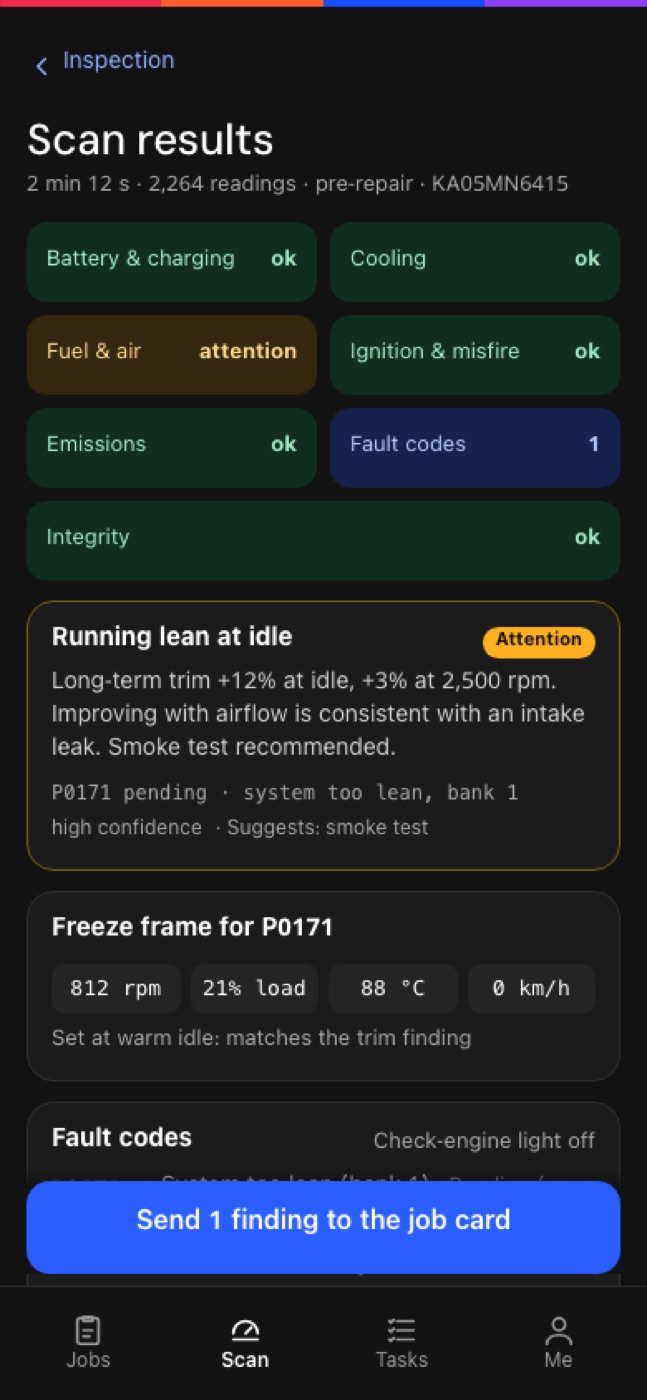
From the MotoDoc build, with demo data. Scans run from Chrome on an Android phone.
Estimate faster. Approve faster.
The estimate goes out as a link from the garage's own WhatsApp. The customer sees what was found and says yes or no to each job. The total follows their choices. No app, no login.
Try it: untick a job and watch the total.
The garage does not need a WhatsApp Business API account.
Sample figures. Work you decline is kept against the car and comes back as a reminder.
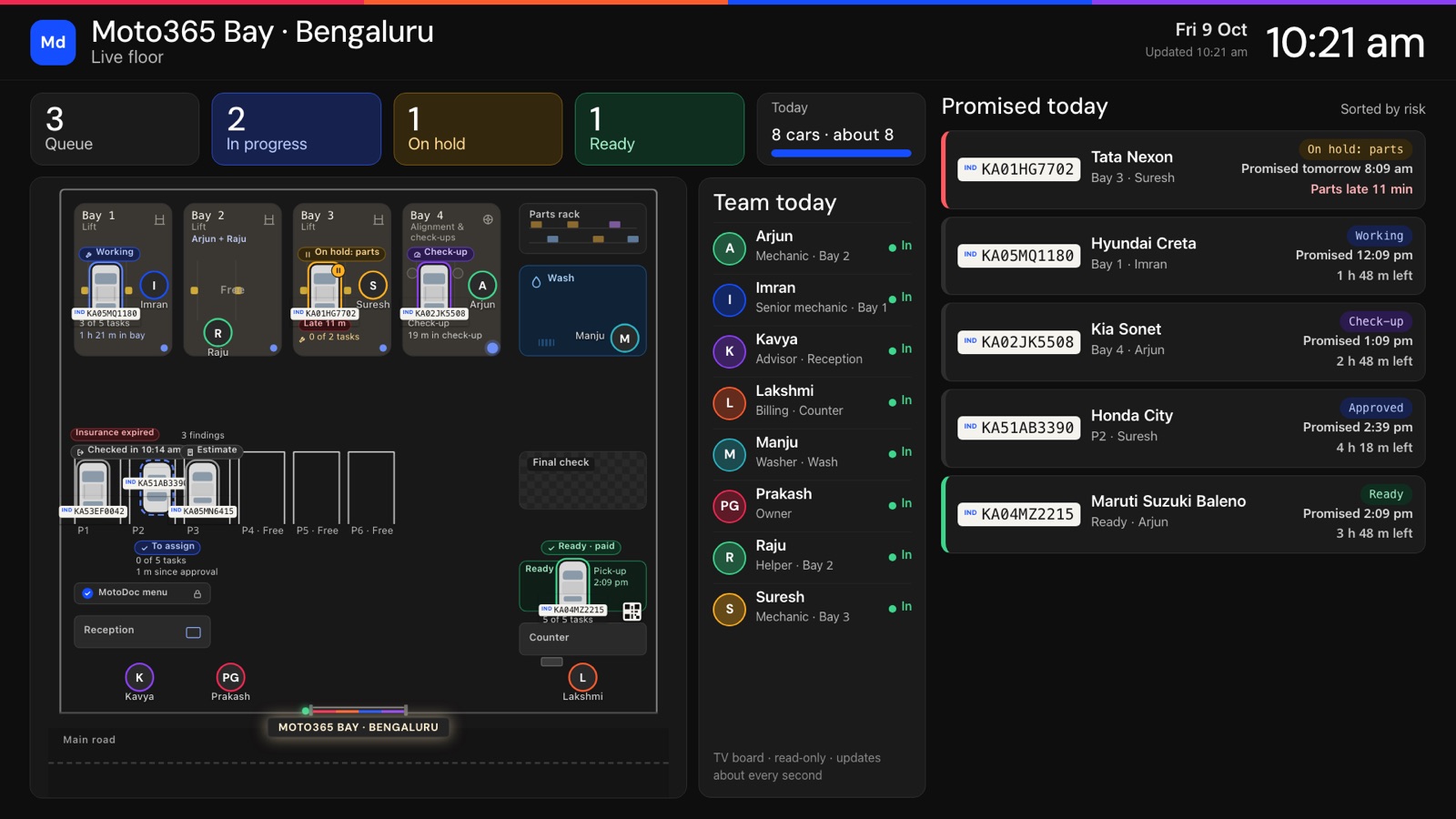
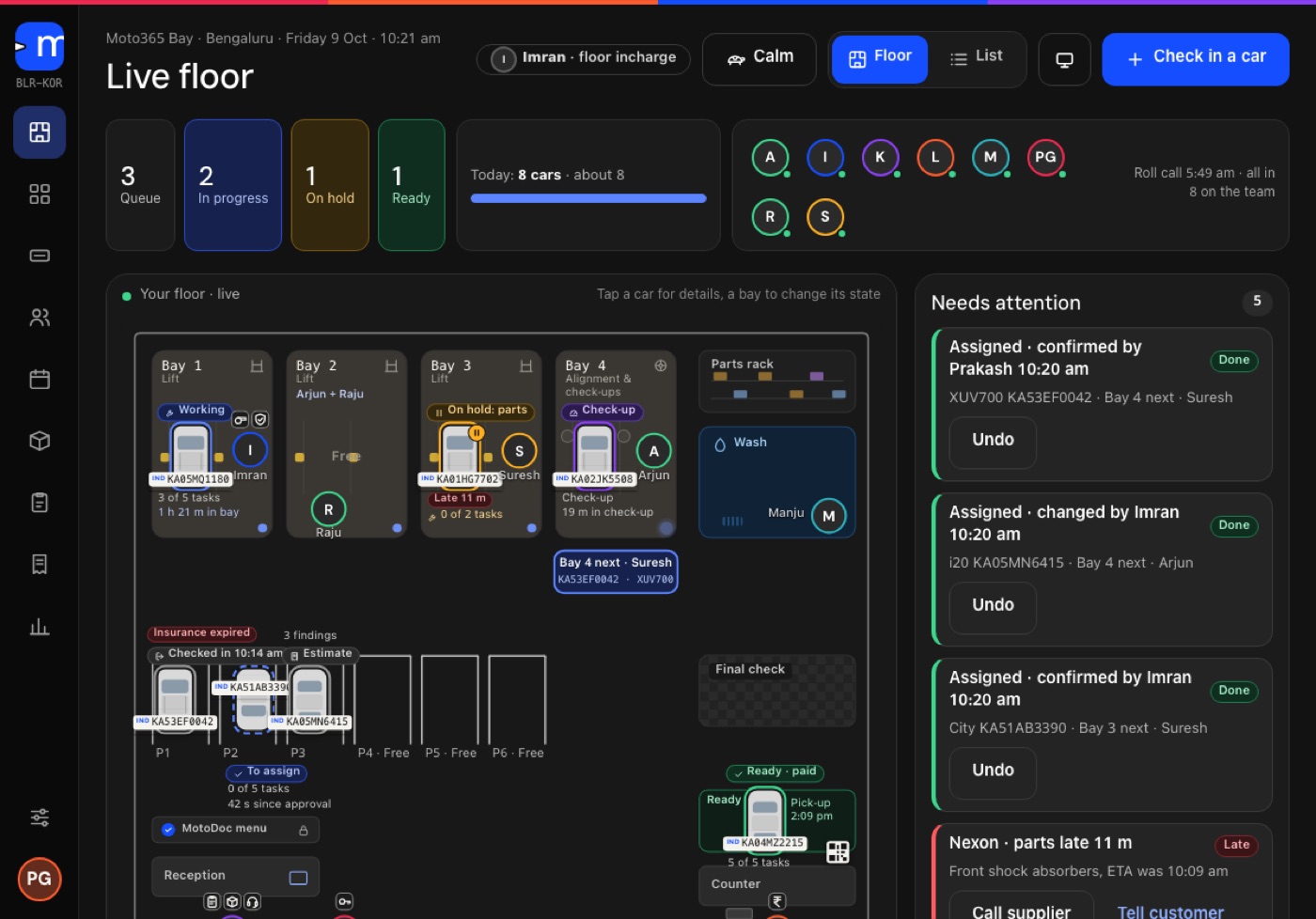
Every bay, every car, right now.
The floor shows which car is in which bay, who is on it and what is waiting for parts. MotoDoc suggests the next bay, and a second person signs the final check before the car is ready.
- Wall board for the workshop TV.
- Needs attention: late parts, cars on hold, jobs waiting for approval.
- Stock and purchase orders tied to the job card.
A GST invoice under your name.
MotoDoc makes the tax invoice with CGST and SGST or IGST, HSN and SAC codes and a running number, under the garage's own logo. It records UPI, cash, card, bank and credit, including part payments.
- A tracker page for the customer, with no login: where the car is, the estimate and the bill.
- A release rule and a gate pass, so a car leaves only when it should.
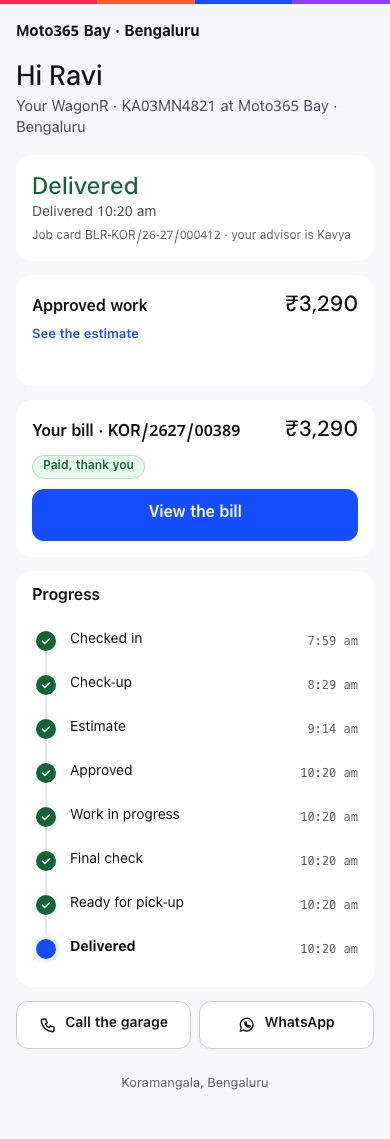
The customer's tracker page, from the MotoDoc build. Demo data.
The next visit starts from the last.
For the next service, and for work the customer said no to this time.
Each delivered visit is written to the owner's logbook on Moto365 Club.
What came in, what was approved, what was billed and what is still owed.
Parts issued to a job come off the shelf count, and purchase orders top it up.
A job moves through twelve states, and everyone sees the same one:
What is built, and what is planned.
MotoDoc was unveiled on 6 February 2026 at ACMA Automechanika in New Delhi. It is in build and has not opened to garages yet. This is the honest list.

MotoDoc is developed in collaboration with TecAlliance, the company behind the TecDoc parts catalogue.
Typed-plate check-in, Vehicle 360, complaints and photos.
In the buildCheck-up list, body, paint and tyre checks, scan through a Bluetooth plug.
In the buildA link sent from the garage's own WhatsApp, approved job by job.
In the buildLive floor, wall board, GST invoice, payments, gate pass, purchase orders.
In the buildFinding the right part for the car on the job card through the TecDoc catalogue.
PlannedPulled on request, starting with Maruti Suzuki, Hyundai and Mahindra.
PlannedReading the number plate from a photo instead of typing it.
PlannedEnglish today. Hindi and Kannada are in draft.
PlannedMotoDoc has its own site, motodoc.in.
This page is the short version. Each part of MotoDoc, how a visit runs from the counter to the gate, and a guide to choosing garage software are on motodoc.in.
What the job card holds, why every line carries a reason, and the twelve statuses a car moves through.
On motodoc.in Estimate approval on WhatsAppThe message the garage sends, the page the customer opens, and what happens to work they decline.
On motodoc.in Check-up and OBD scanThe forty-point check-up, body and tyre photos, the OBD scan and what you need to run it.
On motodoc.in Workshop floor boardThe live floor, the jobs that need attention, bay suggestions and the wall board for the workshop TV.
On motodoc.in GST billing and paymentsThe GST invoice under the garage's own name, payments, the gate pass, day close and the owner's reports.
On motodoc.in How a visit runsTwelve steps from typing the number plate at the counter to the gate pass, and who does each one.
On motodoc.inWhat garage owners ask.
What is MotoDoc?
A garage operating system: one job card that carries the car from check-in to delivery, with the advisor on a tablet, the technician on a phone and the customer on WhatsApp. It is one of six Moto365 businesses.
Is MotoDoc available now?
Not yet. It was unveiled on 6 February 2026 at ACMA Automechanika, New Delhi, and it is in build. Garages that want to see it can ask for a walkthrough.
What kind of garage is it for?
Independent multi-brand car workshops. It covers cars and light commercial vehicles, not two-wheelers.
What do I need to run it?
It runs in the browser on a tablet, a phone, a desk computer or a TV. It is built first for Android tablets at the counter and Android phones for technicians. A TV for the wall board is optional.
How does check-in work?
The advisor types the number plate and MotoDoc fills in the vehicle, then adds the customer's phone number, the odometer, the complaints and photos.
How does my customer approve work?
You send the estimate from your own WhatsApp. The customer opens a link, sees what was found and approves or declines each item, and the total updates as they choose. No app or login.
Do I need a WhatsApp Business API account?
No. Messages are written for you and sent from the garage's own WhatsApp.
Does the AI decide what is wrong with the car?
No. It suggests and your technician confirms. For tyres, the depth-gauge reading is the truth and the AI is a cross-check.
What does the OBD scan tell me?
Battery and charging, cooling, fuel and air, ignition and misfire, emissions and fault codes, with a finding in plain language that goes onto the job card. Scans need Chrome on an Android phone and a standard ELM327 Bluetooth plug.
Does it make GST bills?
Yes: a tax invoice with CGST and SGST or IGST, HSN and SAC codes and a running number, under your own logo and name. It records UPI, cash, card, bank and credit payments.
What happens to work the customer says no to?
It is kept against the car and comes back as a reminder, so the next visit starts from what was left undone.
Which languages does it work in?
English. Hindi and Kannada are in draft.
See a car go from check-in to delivered.
A walkthrough takes a car through the whole job card on the build. Tell us about your workshop and we will set one up.